Why is cable management crucial for ultrasound carts? The answer reaches far beyond appearance. In a busy imaging room, cables cross paths with feet, wheels, disinfectant wipes, and hurried hands. A loose power cord can pull against a probe cable. A damaged connector can interrupt an examination at the wrong moment. Even small failures create delays, frustration, and avoidable replacement costs.
Biomedical engineering specialist Dr. James R. Keller explains, “Cable management is a small design decision with a large effect on safety, workflow, and equipment life.” His point reflects everyday clinical experience. Well-routed cables keep probes accessible, reduce tangles, and help staff move carts without dragging equipment. They also make cleaning easier around the base, handles, and storage areas. That matters because hidden dust and fluid can collect where cables bend or touch the floor.
Still, tidy routing is not automatically good routing. Cables need enough slack for scanning positions. Tight loops may look professional but can strain internal wires. I have seen carts that appeared organized until a clinician needed to move three meters from the patient. The setup failed then.
This introduction explores seven practical reasons cable management matters for ultrasound carts. It considers patient safety, faster room turnover, probe protection, maintenance access, and ergonomic movement. The best system is not the most decorative one. It is the system that remains safe, flexible, and easy to understand during a demanding examination. Small details matter. Frequently overlooked.
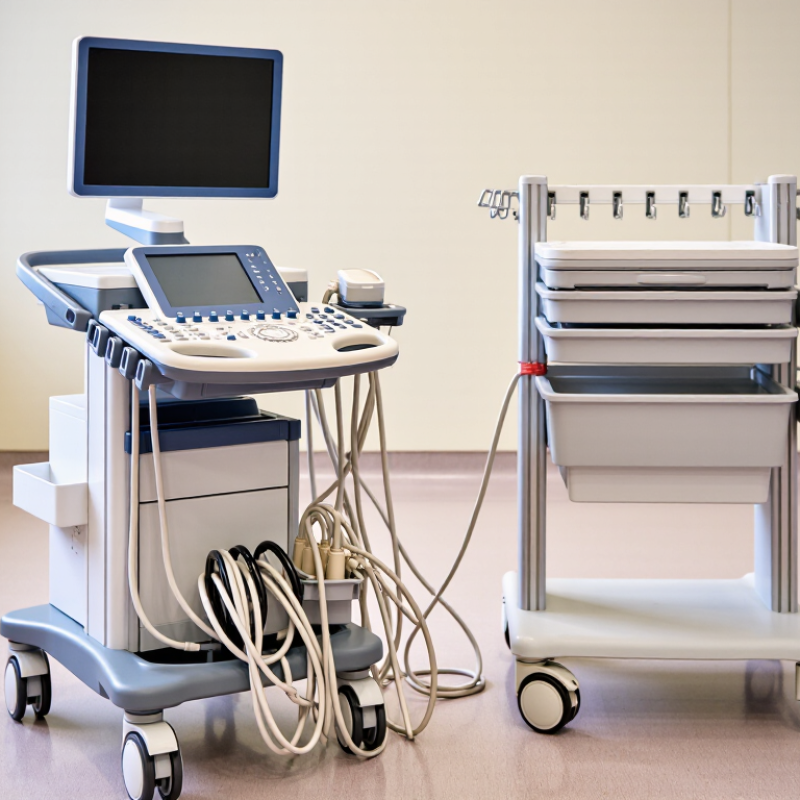
In routine ultrasound-cart inspections, cable hazards are often visible before they become failures. Map every cable from the probe port to the power source. Mark pinch points near drawers, wheels, and height-adjustment joints. Check whether connectors drag across the floor. Look for sharp bends, crushed insulation, loose loops, and stretched leads. Keep power, signal, and accessory cables separated where practical. Secure slack without blocking ventilation or cleaning access. Photograph changes before and after maintenance.
IEC 60601-1 is not a cable-routing manual. It provides a framework for basic safety and essential performance. Use your cable map within the cart’s risk-management process. Ask whether movement could damage insulation, increase leakage current, or interrupt essential imaging functions. Confirm that protective earth paths remain reliable. Inspect strain reliefs after repeated repositioning. A tidy cable may still hide internal stress.
Cleaning adds another hazard. Liquids can follow a cable into a connector. Use approved cleaning methods and inspect sealed interfaces afterward. Test the cart under normal movement, not only while parked. Record findings, corrective actions, and unresolved questions. A risk rating may change after a new accessory is added. That detail is easy to miss. Review the current IEC 60601-1 edition and applicable collateral standards with qualified medical-device safety personnel. Never treat appearance alone as proof of compliance.
Cable hazards should be assessed against the relevant IEC 60601-1 safety areas: protection against electric shock, mechanical hazards, and safe equipment construction. The index below is an illustrative prioritization model using severity × likelihood on a 1–25 scale; it is not a compliance test result.
Higher scores indicate hazards that generally deserve earlier engineering and workflow controls. IEC 60601-1 compliance requires evaluation of the complete medical electrical equipment, including its intended use, accessories, connections, mechanical construction, and applicable risk-management evidence.
Ultrasound cart cables can turn a clear aisle into a trip hazard within minutes. OSHA 29 CFR 1910.22 requires walking-working surfaces to remain clean, orderly, and free from hazards. The 2022 U.S. Bureau of Labor Statistics report recorded 211,640 nonfatal workplace cases involving falls, slips, and trips. Cable routing deserves attention.
Use the shortest practical power and probe leads. Keep cables behind the cart, not across the operator’s path. Secure loose sections with reusable, visible fasteners. Leave doorways and emergency routes open. Separate power cords from data cables where practical. Check cable loops before moving the cart. Inspect the floor after every room change. A low loop can catch a shoe surprisingly easily.
Place excess cable on the cart’s rear side, never beneath casters. Maintain enough slack for scanning without creating a hanging loop. Mark damaged insulation and remove that cable from service. OSHA also expects regular inspection and maintenance of walking surfaces. A rushed setup can defeat a careful policy. I have seen staff secure the main cord while missing a probe cable near the bed. That small oversight needs a second look. Documentation helps: record the inspection, the room, and any correction. These simple habits support clearer routes and safer daily imaging work.
| Tip | Cable-Management Practice | Why It Matters | Recommended Control | Verification Measure | Relevant OSHA 29 CFR 1910.22 Principle | Priority |
|---|---|---|---|---|---|---|
| 1 | Route cables away from walking paths. | Loose cables across aisles or around the patient area can create slip, trip, and fall hazards during examination or transport. | Use the shortest practical route along the cart frame, wall, or designated service channel. Do not run cables diagonally across a walkway. | Confirm that no cable crosses a normal walking route when the cart is positioned for use. | Keep walking-working surfaces free of recognized hazards likely to cause injury. | High |
| 2 | Secure cables at the cart base and frame. | Unrestrained cords can snag on feet, wheels, equipment, or nearby furniture and may be pulled from electrical or medical connections. | Use compatible cable clips, sleeves, or reusable hook-and-loop ties. Keep fasteners snug without crushing or sharply bending the cable. | Perform a visual and hand check before each shift or patient session to ensure cables remain attached and protected. | Maintain orderly work areas and prevent conditions that can create hazards. | High |
| 3 | Separate power, data, and probe cables. | Organized routing reduces tangling, makes faults easier to identify, and helps prevent accidental disconnection during cart movement. | Group cables by function and use clearly labeled, non-permanent identification where needed. Keep probe cables in their intended holders when not in use. | Check that each cable can be traced from its connection point to its storage or operating position without crossing another route. | Keep surfaces and work areas clean, orderly, and sanitary. | Medium |
| 4 | Leave adequate slack for cart adjustment. | Insufficient slack can place tension on connectors, strain reliefs, and ports when the cart height or position changes. | Allow controlled slack near adjustable joints and connection points, while preventing loops from reaching the floor or forming a snag point. | Raise, lower, and reposition the cart through its normal range while checking for pulling, pinching, or floor contact. | Keep passageways and work areas in a condition that supports safe movement. | High |
| 5 | Protect cables at doorways and floor transitions. | Door thresholds, floor transitions, and high-traffic areas increase the likelihood of abrasion, compression, and trips. | Reroute the cable whenever possible. If a temporary crossing is unavoidable, use a purpose-designed low-profile cable cover that is secured and suitable for the location. | Inspect the route for exposed conductors, damaged insulation, raised edges, or movement of the cable cover. | Keep walking-working surfaces free from hazards and maintain passageways in good repair. | High |
| 6 | Keep wheels, brakes, and casters clear. | Cables caught in casters can restrict movement, interfere with braking, or pull the cart unexpectedly. | Route cables above the caster zone and inspect the area before moving the cart. Apply wheel brakes when the cart is stationary and in use. | Move the cart slowly over its normal route and verify that no cable contacts wheels, brakes, or moving mechanisms. | Maintain clear passageways and eliminate conditions that can cause falls or loss of control. | High |
| 7 | Include cable routing in routine inspections and cleaning. | Repeated repositioning, cleaning, and disinfection can loosen fasteners or leave cables in temporary locations that become hazards. | Add cable routing to the cart checklist. Re-secure cables after cleaning, equipment changes, or room transfers, and remove damaged cables from service according to facility procedure. | Document inspection completion and correct defects before the cart returns to service. | Keep workplaces clean, orderly, sanitary, and free of hazards that could cause injury. | Medium |
7 Tips Why Cable Management Matters for Ultrasound Carts
Secure and Label Leads Using AAMI EQ56 Equipment Management Practices
A well-managed ultrasound cart begins with a clear equipment process. AAMI EQ56 emphasizes organized inspection, maintenance, documentation, and accountability. Apply those principles to every lead. Inspect cables before each shift. Look for crushed insulation, loose connectors, exposed shielding, or damaged strain relief. Remove questionable leads from service. Do not rely on appearance alone.
Route each lead along the cart’s frame, not across walking paths. Use approved, non-damaging fasteners to prevent pulling during transport. Keep patient-contact leads separate from power cords and accessories. Label both ends with durable, readable identifiers. Include the lead’s function, asset reference, and inspection status. Small labels matter. They prevent hurried substitutions. They also make missing equipment easier to find.
Record inspections in the equipment log, including defects and corrective actions. A supervisor should verify that labels remain readable after cleaning. Staff training should cover safe coiling, connector handling, and storage. In practice, even careful teams miss one detail: a cable can look secure while bending sharply behind the cart. I have found that a hand check catches problems visual checks miss. Review the setup after relocation, not only during scheduled rounds. Perfect routing is difficult in crowded rooms. That is worth acknowledging. Consistent checks reduce the risk.
Clean cables support safer ultrasound cart operation and more reliable clinical work. Under IEC 60601-1 maintenance controls, inspection should consider basic safety, essential performance, and the cart’s working environment. Disconnect power before cleaning or handling cables. Use approved cleaning materials, then dry every surface completely. Moisture can enter connectors and create hidden problems.
Check insulation for cuts, flattening, cracks, discoloration, or exposed shielding. Examine plugs, strain reliefs, locking parts, and cable exits near the probe and cart. Do not pull a cable to move the cart. Keep cables away from wheels, sharp edges, heat sources, and patient pathways. Loose loops can snag during repositioning. Small details matter.
A clean appearance is not proof of electrical safety. A cable may look acceptable while its internal conductors suffer repeated bending. I have learned that rushed visual checks can miss stress near connectors. That weakness deserves correction.
Follow the equipment service instructions and your facility’s documented risk controls. Qualified personnel should perform electrical safety testing when required by local procedures, especially after repair or suspected damage.
Record inspection dates, findings, cleaning actions, and decisions to remove equipment from service. If a cable feels unusually warm, smells burnt, produces intermittent images, or shows damage, stop using the cart and request assessment. Short checks prevent longer disruptions.
Audit Seven Cable Practices with Trip, Damage, and Setup-Time Metrics
Cable control is a clinical safety practice, not a cosmetic task. The World Health Organization estimates that one in ten patients experiences harm during healthcare delivery. Many incidents are preventable. Loose ultrasound cables can create trip points, snag on bedrails, and pull connectors from ports. The U.S. Bureau of Labor Statistics recorded 885 fatal work injuries involving falls, slips, or trips in 2023. That figure does not describe ultrasound carts directly, but it shows why floor-level hazards deserve measurement. ECRI’s healthcare technology hazard guidance also emphasizes equipment condition, usability, and maintenance.
Audit seven controls. Route cables away from walking paths. Secure slack beneath the cart. Label both ends. Separate power and data lines. Inspect insulation before every shift. Keep connectors off the floor. Park the cart with cables facing inward.
Record trips per 100 examinations, damaged cables per 100 cart-days, and setup minutes per examination. Compare results weekly. A practical target might be zero exposed cables and fewer than two setup minutes. Targets need local validation. A perfect score is unrealistic.
The first audit may miss hidden damage behind the monitor. Photograph problem areas and review them with sonographers and technicians. If a cable repeatedly catches on a drawer, redesign the route rather than blaming users. ECRI recommendations support documented inspection and maintenance, while WHO’s patient-safety framework favors learning from near misses. Record those near misses. They reveal weak controls before an injury occurs.
Mapping shows pinch points near drawers, wheels, and height-adjustment joints. It also reveals stretched leads and sharp bends.
Remove cables with crushed insulation, exposed shielding, loose connectors, or damaged strain reliefs from service. Do not rely on appearance alone.
Route leads along the cart frame, away from walking paths. Keep connectors off the floor and secure slack without blocking ventilation.
Yes, separate them where practical. Keep patient-contact leads away from power cords and accessory cables.
Label both ends with the cable function, asset reference, and inspection status. Use durable labels that survive cleaning.
Perform a hand check behind the cart. A secure-looking cable may still bend sharply or carry internal stress.
Inspect cables before every shift and after relocation. Test the cart during normal movement, not only while parked.
Record defects, corrective actions, unresolved questions, and inspection dates. Photographs can show changes before and after maintenance.
Track trips per 100 examinations, damaged cables per 100 cart-days, and setup minutes per examination.
Redesign the cable route instead of blaming users. Record near misses because they expose weak controls early.
Why is cable management crucial for ultrasound carts? Proper cable control supports patient safety, clinical efficiency, and equipment reliability. A well-organized cart reduces trip hazards by keeping walking surfaces clear, while thoughtful routing helps prevent excessive bending, crushing, and accidental disconnection. Cables should be secured and clearly labeled so staff can identify each lead quickly during examinations, maintenance, and room changes. These practices also help align daily equipment handling with relevant medical electrical safety, workplace walking-surface, and healthcare equipment-management expectations.
Regular cleaning and inspection are equally important. Staff should check cables for fraying, loose connectors, damaged insulation, and contamination, then remove defective items from service according to facility procedures. A practical audit can track seven key habits, including routing, securing, labeling, cleaning, inspection, storage, and setup consistency. Measuring trip incidents, cable damage, and examination setup time provides clear evidence of improvement and helps teams refine their workflow. Ultimately, disciplined cable management protects users, supports dependable imaging, and extends the useful life of ultrasound cart accessories.

Avelar Medical